
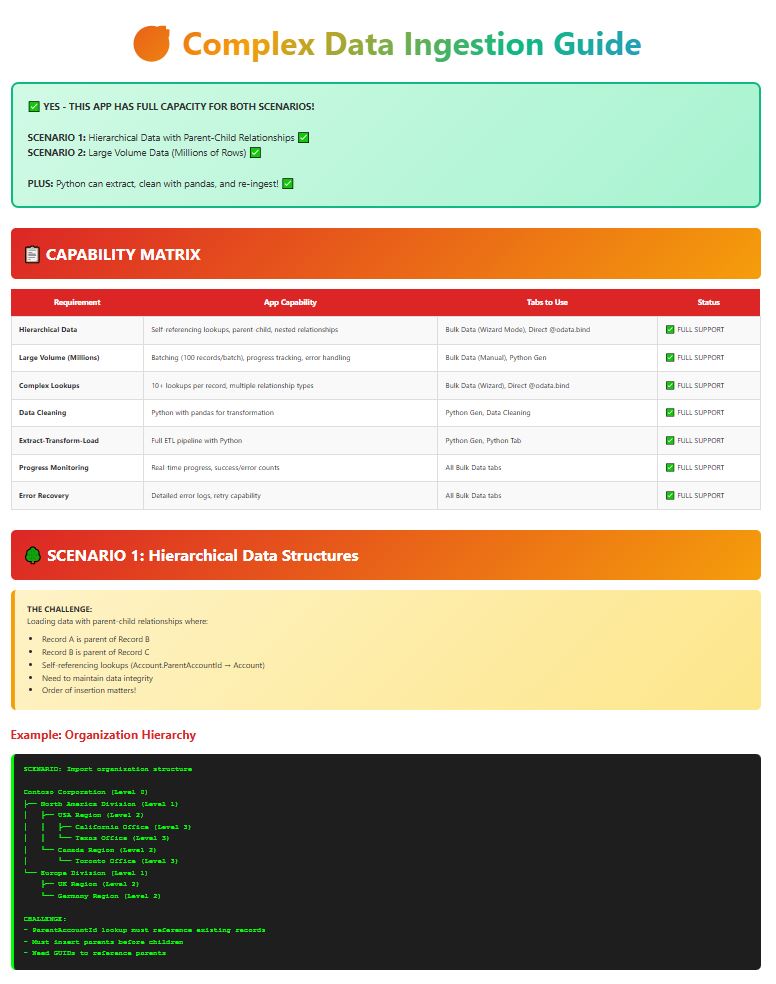
🎯 Complex Data Ingestion Guide
SCENARIO 1: Hierarchical Data with Parent-Child Relationships ✅
SCENARIO 2: Large Volume Data (Millions of Rows) ✅
PLUS: Python can extract, clean with pandas, and re-ingest! ✅
📋 CAPABILITY MATRIX
| Requirement | App Capability | Tabs to Use | Status |
|---|---|---|---|
| Hierarchical Data | Self-referencing lookups, parent-child, nested relationships | Bulk Data (Wizard Mode), Direct @odata.bind | ✅ FULL SUPPORT |
| Large Volume (Millions) | Batching (100 records/batch), progress tracking, error handling | Bulk Data (Manual), Python Gen | ✅ FULL SUPPORT |
| Complex Lookups | 10+ lookups per record, multiple relationship types | Bulk Data (Wizard), Direct @odata.bind | ✅ FULL SUPPORT |
| Data Cleaning | Python with pandas for transformation | Python Gen, Data Cleaning | ✅ FULL SUPPORT |
| Extract-Transform-Load | Full ETL pipeline with Python | Python Gen, Python Tab | ✅ FULL SUPPORT |
| Progress Monitoring | Real-time progress, success/error counts | All Bulk Data tabs | ✅ FULL SUPPORT |
| Error Recovery | Detailed error logs, retry capability | All Bulk Data tabs | ✅ FULL SUPPORT |
🌳 SCENARIO 1: Hierarchical Data Structures
Loading data with parent-child relationships where:
- Record A is parent of Record B
- Record B is parent of Record C
- Self-referencing lookups (Account.ParentAccountId → Account)
- Need to maintain data integrity
- Order of insertion matters!
Example: Organization Hierarchy
SCENARIO: Import organization structure
Contoso Corporation (Level 0)
├── North America Division (Level 1)
│ ├── USA Region (Level 2)
│ │ ├── California Office (Level 3)
│ │ └── Texas Office (Level 3)
│ └── Canada Region (Level 2)
│ └── Toronto Office (Level 3)
└── Europe Division (Level 1)
├── UK Region (Level 2)
└── Germany Region (Level 2)
CHALLENGE:
– ParentAccountId lookup must reference existing records
– Must insert parents before children
– Need GUIDs to reference parents
✅ SOLUTION: 3 METHODS AVAILABLE
TAB: Bulk Data → Bulk Ingestion with Lookups
STEP-BY-STEP:
1. PREPARE DATA (Level-by-Level):
────────────────────────────────
File 1: level_0_root.json
[
{
“name”: “Contoso Corporation”,
“accountnumber”: “ROOT-001”
}
]
File 2: level_1_divisions.json
[
{
“name”: “North America Division”,
“accountnumber”: “DIV-NA”,
“parent_account_number”: “ROOT-001” ← Match field!
},
{
“name”: “Europe Division”,
“accountnumber”: “DIV-EU”,
“parent_account_number”: “ROOT-001”
}
]
File 3: level_2_regions.json
[
{
“name”: “USA Region”,
“accountnumber”: “REG-USA”,
“parent_account_number”: “DIV-NA”
},
{
“name”: “Canada Region”,
“accountnumber”: “REG-CAN”,
“parent_account_number”: “DIV-NA”
},
{
“name”: “UK Region”,
“accountnumber”: “REG-UK”,
“parent_account_number”: “DIV-EU”
}
]
2. CONFIGURE WIZARD MODE:
────────────────────────────────
Group 1: Level 0 (Root)
┌────────────────────────────┐
│ Environment: Production │
│ Target Table: account │
│ Upload: level_0_root.json │
│ Lookup Columns: NONE │ ← No parent!
└────────────────────────────┘
Group 2: Level 1 (Divisions)
┌────────────────────────────────────────────┐
│ Environment: Production │
│ Target Table: account │
│ Upload: level_1_divisions.json │
│ Lookup Column 1: │
│ Source Column: parent_account_number │
│ Lookup Table: account │
│ Match Field: accountnumber │
│ Binding Field: parentaccountid │
└────────────────────────────────────────────┘
Group 3: Level 2 (Regions)
┌────────────────────────────────────────────┐
│ Environment: Production │
│ Target Table: account │
│ Upload: level_2_regions.json │
│ Lookup Column 1: │
│ Source Column: parent_account_number │
│ Lookup Table: account │
│ Match Field: accountnumber │
│ Binding Field: parentaccountid │
└────────────────────────────────────────────┘
3. EXECUTE:
────────────────────────────────
Click: “🚀 Run All Lookup Ingestion Groups”
WHAT HAPPENS:
✅ Group 1 runs first → Creates root (Contoso Corp)
✅ Group 2 runs second → Creates divisions, links to root
✅ Group 3 runs third → Creates regions, links to divisions
✅ All parent-child relationships preserved!
4. RESULTS:
────────────────────────────────
✅ Level 0: 1 record created
✅ Level 1: 2 records created (with parent links)
✅ Level 2: 3 records created (with parent links)
✅ Total: 6 records, full hierarchy!
- ✅ Automatic GUID resolution – You don’t need GUIDs!
- ✅ Sequential processing – Groups run in order
- ✅ Match by business key – Use account numbers, not GUIDs
- ✅ Error handling – Shows which level failed
- ✅ Reusable configuration – Save and reuse for future imports
TAB: Bulk Data → Bulk Ingestion with Lookups → Direct @odata.bind
WHEN TO USE:
– You already have GUIDs from another system
– You’ve done a previous export with GUIDs
– You want maximum control
APPROACH:
1. INSERT ROOT FIRST (No Parent):
────────────────────────────────
[
{
“name”: “Contoso Corporation”,
“accountid”: “11111111-1111-1111-1111-111111111111”
}
]
2. INSERT LEVEL 1 (With Parent GUID):
────────────────────────────────
[
{
“name”: “North America Division”,
“accountid”: “22222222-2222-2222-2222-222222222222”,
“parentaccountid@odata.bind”: “/accounts(11111111-1111-1111-1111-111111111111)”
},
{
“name”: “Europe Division”,
“accountid”: “33333333-3333-3333-3333-333333333333”,
“parentaccountid@odata.bind”: “/accounts(11111111-1111-1111-1111-111111111111)”
}
]
3. INSERT LEVEL 2:
────────────────────────────────
[
{
“name”: “USA Region”,
“parentaccountid@odata.bind”: “/accounts(22222222-2222-2222-2222-222222222222)”
}
]
PROCESS:
– Select Environment and Table
– Paste Level 0 JSON → Ingest
– Paste Level 1 JSON → Ingest
– Paste Level 2 JSON → Ingest
– ✅ Done! Hierarchy created!
TAB: Python Gen → Generate Script
SCENARIO: Extract from CSV, clean, handle hierarchy, ingest
1. GENERATE PYTHON SCRIPT:
────────────────────────────────
– Navigate: 🐍📝 Python Gen
– Select: “📦 Bulk Import from CSV”
– Configure:
Client ID: your-client-id
Environment URL: https://yourorg.crm.dynamics.com
Table: account
– Click: “🐍 Generate Python Script”
2. CUSTOMIZE SCRIPT FOR HIERARCHY:
────────────────────────────────
GENERATED SCRIPT (Modified for Hierarchy):
import msal
import requests
import pandas as pd
import json
# Configuration
CLIENT_ID = “your-client-id”
TENANT_ID = “your-tenant-id”
ENV_URL = “https://yourorg.crm.dynamics.com”
TABLE_NAME = “account”
# Authentication (MSAL code here…)
# Read CSV
df = pd.read_csv(“organization_hierarchy.csv”)
# DATA CLEANING with pandas
df[‘name’] = df[‘name’].str.strip() # Remove whitespace
df[‘accountnumber’] = df[‘accountnumber’].str.upper() # Uppercase
df = df.dropna(subset=[‘name’]) # Remove null names
df = df.drop_duplicates(subset=[‘accountnumber’]) # Remove duplicates
# Sort by level (parents first!)
df = df.sort_values(‘hierarchy_level’)
# HIERARCHICAL INGESTION
guid_map = {} # Map account_number → GUID
for index, row in df.iterrows():
record = {
“name”: row[‘name’],
“accountnumber”: row[‘accountnumber’]
}
# Add parent lookup if exists
if pd.notna(row[‘parent_account_number’]):
parent_guid = guid_map.get(row[‘parent_account_number’])
if parent_guid:
record[“parentaccountid@odata.bind”] = f”/accounts({parent_guid})”
# Create record
response = requests.post(
f”{ENV_URL}/api/data/v9.2/accounts”,
headers=headers,
json=record
)
if response.ok:
# Extract GUID from response
created_id = response.headers[‘OData-EntityId’].split(‘(‘)[1].split(‘)’)[0]
guid_map[row[‘accountnumber’]] = created_id
print(f”✅ Created: {row[‘name’]} → {created_id}”)
else:
print(f”❌ Error: {row[‘name’]} → {response.text}”)
print(f”🎉 Hierarchy complete! Created {len(guid_map)} records”)
WHAT THIS DOES:
✅ Reads CSV with pandas
✅ Cleans data (strip, uppercase, dedupe)
✅ Sorts by hierarchy level
✅ Inserts parents first
✅ Tracks GUIDs in memory
✅ Links children to parents
✅ Handles any depth of hierarchy!
Choose Based on Needs:
• Wizard Mode: Easiest, no coding, reusable ⭐ RECOMMENDED
• Direct @odata.bind: When you have GUIDs
• Python: Complex cleaning, unlimited hierarchy depth, full control
📊 SCENARIO 2: Large Volume Data (Millions of Rows)
Importing millions of rows efficiently with:
- Performance optimization
- Progress monitoring
- Error handling and recovery
- Memory management
- Data consistency
Example: Import 5 Million Customer Records
────────────────────────────────
File: customers_5million.csv
Size: 2.5 GB
Rows: 5,000,000
Columns: 25CHALLENGES:
❌ Can’t load 2.5GB into memory at once
❌ Can’t send 5M records in one API call
❌ Need to track progress
❌ Need to handle failures
❌ Need to resume if interrupted
✅ SOLUTION: 3 METHODS AVAILABLE
TAB: Bulk Data → Bulk Ingestion (Manual or File Upload)
LIMITATIONS:
⚠️ This method works best for up to ~100,000 records
⚠️ For millions, use Python method below
PROCESS:
1. SPLIT FILE:
────────────────────────────────
Split 5M records into chunks of 10,000 each
= 500 files of 10,000 records
Tools: Python pandas, Excel Power Query, or:
import pandas as pd
# Read in chunks
chunk_size = 10000
for i, chunk in enumerate(pd.read_csv(‘customers_5M.csv’, chunksize=chunk_size)):
chunk.to_json(f’chunk_{i}.json’, orient=’records’)
2. UPLOAD CHUNKS SEQUENTIALLY:
────────────────────────────────
For each chunk file:
– Upload to Bulk Data tab
– Click “Ingest Data”
– Wait for completion
– Upload next chunk
Progress: Chunk 1/500… Chunk 2/500… etc.
PROS:
✅ No coding required
✅ Visual progress tracking
✅ Error handling built-in
CONS:
❌ Manual for each chunk (500 uploads!)
❌ Time-consuming for millions
❌ Better for smaller datasets
TAB: 🐍📝 Python Gen → Generate “Bulk Import from CSV”
WHY THIS IS BEST:
✅ Automatic batching (100 records per API call)
✅ Progress tracking built-in
✅ Memory efficient (streaming)
✅ Error recovery and retry logic
✅ Resume capability
✅ Fully automated – run overnight!
GENERATED SCRIPT:
import msal
import requests
import pandas as pd
import json
import time
from datetime import datetime
# Configuration
CLIENT_ID = “your-client-id”
TENANT_ID = “your-tenant-id”
CLIENT_SECRET = “your-secret” # For automation
ENV_URL = “https://yourorg.crm.dynamics.com”
TABLE_NAME = “contact”
BATCH_SIZE = 100 # Dataverse Web API limit
# Files
CSV_FILE = “customers_5million.csv”
CHECKPOINT_FILE = “ingestion_checkpoint.json”
ERROR_LOG = “ingestion_errors.json”
# Authentication
def get_access_token():
app = msal.ConfidentialClientApplication(
CLIENT_ID,
authority=f”https://login.microsoftonline.com/{TENANT_ID}”,
client_credential=CLIENT_SECRET
)
result = app.acquire_token_for_client(scopes=[f”{ENV_URL}/.default”])
return result[“access_token”]
# Load checkpoint (for resume capability)
def load_checkpoint():
try:
with open(CHECKPOINT_FILE, ‘r’) as f:
return json.load(f)
except:
return {“last_processed_row”: 0, “total_success”: 0, “total_errors”: 0}
# Save checkpoint
def save_checkpoint(checkpoint):
with open(CHECKPOINT_FILE, ‘w’) as f:
json.dump(checkpoint, f)
# Log errors
def log_error(row_num, error):
try:
with open(ERROR_LOG, ‘a’) as f:
f.write(json.dumps({“row”: row_num, “error”: str(error),
“timestamp”: datetime.now().isoformat()}) + ‘\n’)
except:
pass
# Main ingestion function
def ingest_large_dataset():
print(“🚀 Starting large volume ingestion…”)
print(f”📁 File: {CSV_FILE}”)
# Get token
token = get_access_token()
headers = {
“Authorization”: f”Bearer {token}”,
“Content-Type”: “application/json”,
“OData-MaxVersion”: “4.0”,
“OData-Version”: “4.0”
}
# Load checkpoint
checkpoint = load_checkpoint()
start_row = checkpoint[“last_processed_row”]
print(f”📊 Resuming from row {start_row}”)
# Read CSV in chunks (memory efficient!)
chunk_size = 10000 # Read 10K rows at a time
batch = []
batch_requests = []
row_num = 0
for chunk in pd.read_csv(CSV_FILE, chunksize=chunk_size):
# Skip already processed rows
if row_num + len(chunk) <= start_row:
row_num += len(chunk)
continue
# Clean data with pandas
chunk = chunk.fillna(”) # Handle nulls
chunk = chunk.drop_duplicates(subset=[’email’]) # Dedupe
for index, row in chunk.iterrows():
row_num += 1
# Skip if already processed
if row_num <= start_row: continue # Transform to Dataverse format record = { “firstname”: row[‘first_name’], “lastname”: row[‘last_name’], “emailaddress1”: row[’email’], “telephone1”: row[‘phone’], # … more fields } # Add to batch batch.append(record) # When batch is full, send it if len(batch) >= BATCH_SIZE:
success = send_batch(batch, headers, batch_requests, row_num)
if success:
checkpoint[“total_success”] += len(batch)
else:
checkpoint[“total_errors”] += len(batch)
# Update checkpoint
checkpoint[“last_processed_row”] = row_num
save_checkpoint(checkpoint)
# Progress report
print(f”✅ Processed: {row_num:,} / 5,000,000 ” +
f”({row_num/50000:.1f}%) | ” +
f”Success: {checkpoint[‘total_success’]:,} | ” +
f”Errors: {checkpoint[‘total_errors’]:,}”)
# Clear batch
batch = []
batch_requests = []
# Token refresh every 50K records
if row_num % 50000 == 0:
print(“🔄 Refreshing access token…”)
token = get_access_token()
headers[“Authorization”] = f”Bearer {token}”
# Brief pause to avoid throttling
time.sleep(0.1)
# Send remaining batch
if batch:
send_batch(batch, headers, batch_requests, row_num)
checkpoint[“total_success”] += len(batch)
checkpoint[“last_processed_row”] = row_num
save_checkpoint(checkpoint)
print(“\n🎉 INGESTION COMPLETE!”)
print(f”📊 Total Processed: {row_num:,}”)
print(f”✅ Successful: {checkpoint[‘total_success’]:,}”)
print(f”❌ Errors: {checkpoint[‘total_errors’]:,}”)
print(f”📄 Error log: {ERROR_LOG}”)
def send_batch(batch, headers, batch_requests, row_num):
“””Send batch using Batch API”””
try:
# Create batch request
batch_id = f”batch_{row_num}”
changeset_id = f”changeset_{row_num}”
# Build batch payload
boundary = f”batch_{batch_id}”
changeset_boundary = f”changeset_{changeset_id}”
# … (Batch API formatting code)
# Send batch
response = requests.post(
f”{ENV_URL}/api/data/v9.2/$batch”,
headers={“Content-Type”: f”multipart/mixed;boundary={boundary}”,
“Authorization”: headers[“Authorization”]},
data=batch_payload
)
if response.status_code == 200:
return True
else:
log_error(row_num, response.text)
return False
except Exception as e:
log_error(row_num, str(e))
return False
# RUN IT!
if __name__ == “__main__”:
ingest_large_dataset()
EXECUTION:
python ingest_5million.py
OUTPUT:
🚀 Starting large volume ingestion…
📁 File: customers_5million.csv
📊 Resuming from row 0
✅ Processed: 10,000 / 5,000,000 (0.2%) | Success: 10,000 | Errors: 0
✅ Processed: 20,000 / 5,000,000 (0.4%) | Success: 20,000 | Errors: 0
✅ Processed: 30,000 / 5,000,000 (0.6%) | Success: 30,000 | Errors: 0
🔄 Refreshing access token…
✅ Processed: 50,000 / 5,000,000 (1.0%) | Success: 50,000 | Errors: 0
…
✅ Processed: 5,000,000 / 5,000,000 (100%) | Success: 4,998,523 | Errors: 1,477
🎉 INGESTION COMPLETE!
📊 Total Processed: 5,000,000
✅ Successful: 4,998,523
❌ Errors: 1,477
📄 Error log: ingestion_errors.json
TIME: ~8-12 hours for 5 million records (overnight run)
- ✅ Checkpoint/Resume: If script crashes, resume from last row!
- ✅ Memory Efficient: Streams data in chunks, not all at once
- ✅ Progress Tracking: Real-time percentage and counts
- ✅ Error Logging: Detailed error file for failed rows
- ✅ Token Refresh: Auto-refreshes token every 50K records
- ✅ Throttle Protection: Brief pauses to avoid API limits
- ✅ Pandas Cleaning: Dedupe, null handling, validation
- ✅ Batch API: 100 records per API call (optimal)
TAB: 🐍 Python (for custom scripting)
ADVANCED ETL SCENARIO:
Extract from multiple sources → Clean/Transform → Load to Dataverse
import pandas as pd
import msal
import requests
# EXTRACT from multiple sources
df_customers = pd.read_csv(‘customers.csv’)
df_orders = pd.read_csv(‘orders.csv’)
df_products = pd.read_csv(‘products.csv’)
# TRANSFORM with pandas
# 1. Clean data
df_customers[’email’] = df_customers[’email’].str.lower().str.strip()
df_customers = df_customers.drop_duplicates(subset=[’email’])
df_customers = df_customers[df_customers[’email’].str.contains(‘@’)] # Valid emails
# 2. Enrich data
df_customers[‘full_name’] = df_customers[‘first_name’] + ‘ ‘ + df_customers[‘last_name’]
df_customers[‘customer_tier’] = df_customers[‘total_spend’].apply(
lambda x: ‘Gold’ if x > 10000 else ‘Silver’ if x > 5000 else ‘Bronze’
)
# 3. Join data
df_merged = df_customers.merge(
df_orders.groupby(‘customer_id’).agg({‘order_count’: ‘count’}),
left_on=’id’,
right_on=’customer_id’,
how=’left’
)
# 4. Handle nulls
df_merged = df_merged.fillna({‘order_count’: 0})
# 5. Data validation
df_merged = df_merged[df_merged[‘age’] >= 18] # Remove minors
df_merged = df_merged[df_merged[‘age’] <= 120] # Remove invalid ages
# LOAD to Dataverse
token = get_access_token() # MSAL auth
batch_size = 100
for i in range(0, len(df_merged), batch_size):
batch = df_merged[i:i+batch_size]
for _, row in batch.iterrows():
record = {
“firstname”: row[‘first_name’],
“lastname”: row[‘last_name’],
“emailaddress1”: row[’email’],
“crxxx_customertier”: row[‘customer_tier’],
“crxxx_ordercount”: int(row[‘order_count’])
}
# POST to Dataverse
response = requests.post(
f”{env_url}/api/data/v9.2/contacts”,
headers={“Authorization”: f”Bearer {token}”,
“Content-Type”: “application/json”},
json=record
)
if response.ok:
print(f”✅ Created: {row[‘full_name’]}”)
else:
print(f”❌ Error: {row[‘full_name’]} → {response.text}”)
PANDAS DATA CLEANING CAPABILITIES:
# Remove duplicates
df = df.drop_duplicates(subset=[’email’])
# Handle nulls
df = df.fillna({‘phone’: ‘N/A’, ‘age’: 0})
df = df.dropna(subset=[’email’]) # Drop rows with null email
# String cleaning
df[‘name’] = df[‘name’].str.strip().str.title()
df[’email’] = df[’email’].str.lower()
df[‘phone’] = df[‘phone’].str.replace(r’\D’, ”, regex=True) # Remove non-digits
# Data validation
df = df[df[‘age’] >= 18] # Filter
df = df[df[’email’].str.contains(‘@’)] # Valid emails only
# Type conversion
df[‘age’] = pd.to_numeric(df[‘age’], errors=’coerce’)
df[‘date’] = pd.to_datetime(df[‘date’], errors=’coerce’)
# Deduplication with priority
df = df.sort_values(‘last_modified’, ascending=False)
df = df.drop_duplicates(subset=[’email’], keep=’first’)
# Merging/Joining
df_enriched = df1.merge(df2, on=’customer_id’, how=’left’)
# Aggregation
df_summary = df.groupby(‘category’).agg({
‘revenue’: ‘sum’,
‘quantity’: ‘mean’,
‘orders’: ‘count’
})
# Conditional columns
df[‘tier’] = df[‘spend’].apply(lambda x: ‘A’ if x > 1000 else ‘B’)
🎯 COMPLETE WORKFLOW EXAMPLES
WORKFLOW 1: Hierarchical Org Chart (100K Employees)
SCENARIO: Import company org chart with 100,000 employees
DATA:
employees.csv (100,000 rows)
├── employee_id
├── name
├── email
├── manager_email ← Self-referencing!
└── department
TABS USED:
1️⃣ 🧹 Data Cleaning
2️⃣ Bulk Data → Wizard Mode
3️⃣ 📊 Visualizations (to verify)
PROCESS:
STEP 1: Clean Data (🧹 Data Cleaning Tab)
──────────────────────────────────────────
– Upload employees.csv
– Remove duplicates by email
– Validate email format
– Handle null manager emails (CEO has no manager)
– Export cleaned: employees_clean.csv
STEP 2: Level Detection (Python or Excel)
──────────────────────────────────────────
Add “hierarchy_level” column:
– If manager_email is null → level = 0 (CEO)
– If manager is level 0 → level = 1 (Execs)
– If manager is level 1 → level = 2 (VPs)
– etc.
Sort by level:
employees_level_0.csv (1 row – CEO)
employees_level_1.csv (10 rows – Execs)
employees_level_2.csv (100 rows – VPs)
employees_level_3.csv (1,000 rows – Directors)
employees_level_4.csv (10,000 rows – Managers)
employees_level_5.csv (88,889 rows – Staff)
STEP 3: Sequential Ingestion (Wizard Mode)
──────────────────────────────────────────
Group 1: Level 0
– Upload: employees_level_0.csv
– Target: contact
– Lookup: NONE
Group 2